Learn, Practice, and Improve with SAP C_THR92_2505 Practice Test Questions

  • 79 Questions
  • Updated on: 3-Mar-2026
  • SAP Certified Associate - SAP SuccessFactors People Analytics: Reporting
  • Valid Worldwide
  • 2790+ Prepared
  • 4.9/5.0

When using Report Center, what permissions are required to create a canvas report on Employee Profile data using the Detailed Reporting tool? Note: There are 3 correct answers to this question.

A. Canvas Designer Admin

B. Canvas Designer

C. Create Reports: Employee Profile

D. Run Report: Employee Profile

E. Report Center

B.   Canvas Designer
C.   Create Reports: Employee Profile
E.   Report Center

The data source used by the two tables only displays current (active) employees. How would you configure a filter on the table End of Previous Year Headcount by Location to display data accurately?
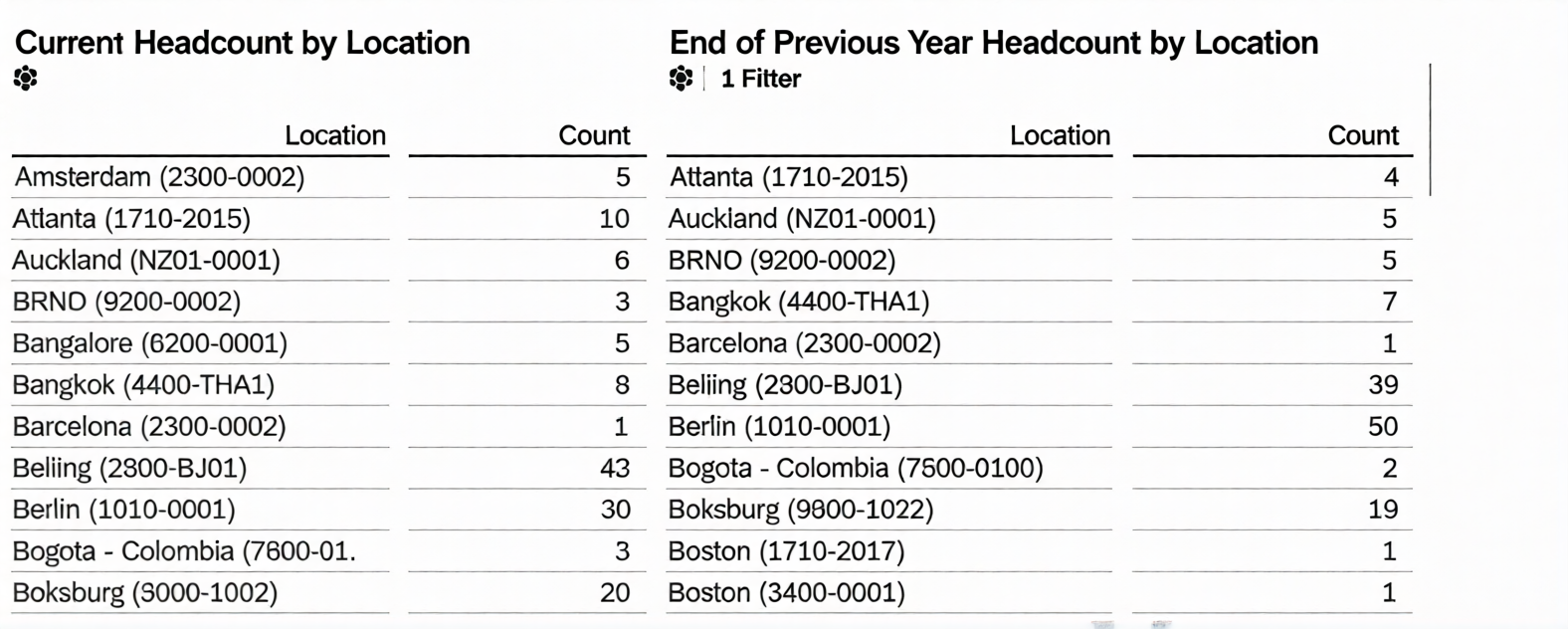
Note: There are 2 correct answers to this question.

A. Set the Range type to Standard.

B. Set a filter on Hire Date (Range).

C. Set a filter on Hire Date (Member).

D. Set the Range type to Offset.

B.   Set a filter on Hire Date (Range).
D.   Set the Range type to Offset.

You are creating a Story report on employment and compensation information. You have created two queries to support the story report. The table and the left chart are using an employment query as its data source. The right chart uses a compensation query as its data source. Both queries include the field for the employee Job Title. When you add an input control to the page, it only filters the table and the left chart. What action must you take to configure the input control to effect both charts and the table?

A. Convert it to a Story Filter.

B. Update Linked Analysis.

C. Enable Cascading Effects.

D. Set up Linked Dimensions.

D.   Set up Linked Dimensions.

You are constructing a Story. You want to return the quarter to date event records to count terminations. Which options would you set in the time filter? Note: There are 3 correct answers to this question.

A. Range Parameters: Period to Date

B. Range period: Actual start/end date of the current quarter

C. Range Type: dynamic

D. Range Type: fixed

E. Records Returned: Include only records that begin in your defined date range

A.   Range Parameters: Period to Date
C.   Range Type: dynamic
E.   Records Returned: Include only records that begin in your defined date range

In Detailed Reporting, what functionality can be used in a calculated column? Note; There are 2 correct answers to this question.

A. Concatenation

B. If/Then/Else statement

C. Average

D. Data type conversion

A.   Concatenation
C.   Average

Within a Story, you create a query using the Basic User Information table. After you add the Proxy Information table, you notice that some of the basic information records are NO longer displayed in the preview. How do you adjust the query to return the missing records in the preview?

A. Remove the related table and select and drag it from the Available Data section.

B. Remove the related table and add it using the Show Related Tables command from the Action Menu.

C. Change the join type to Left Outer Join.

D. Change the join type to Inner Join.

C.   Change the join type to Left Outer Join.

You are creating a calculated column to calculate an employee's organizational tenure. Why does the formula in the screenshot result in an error?
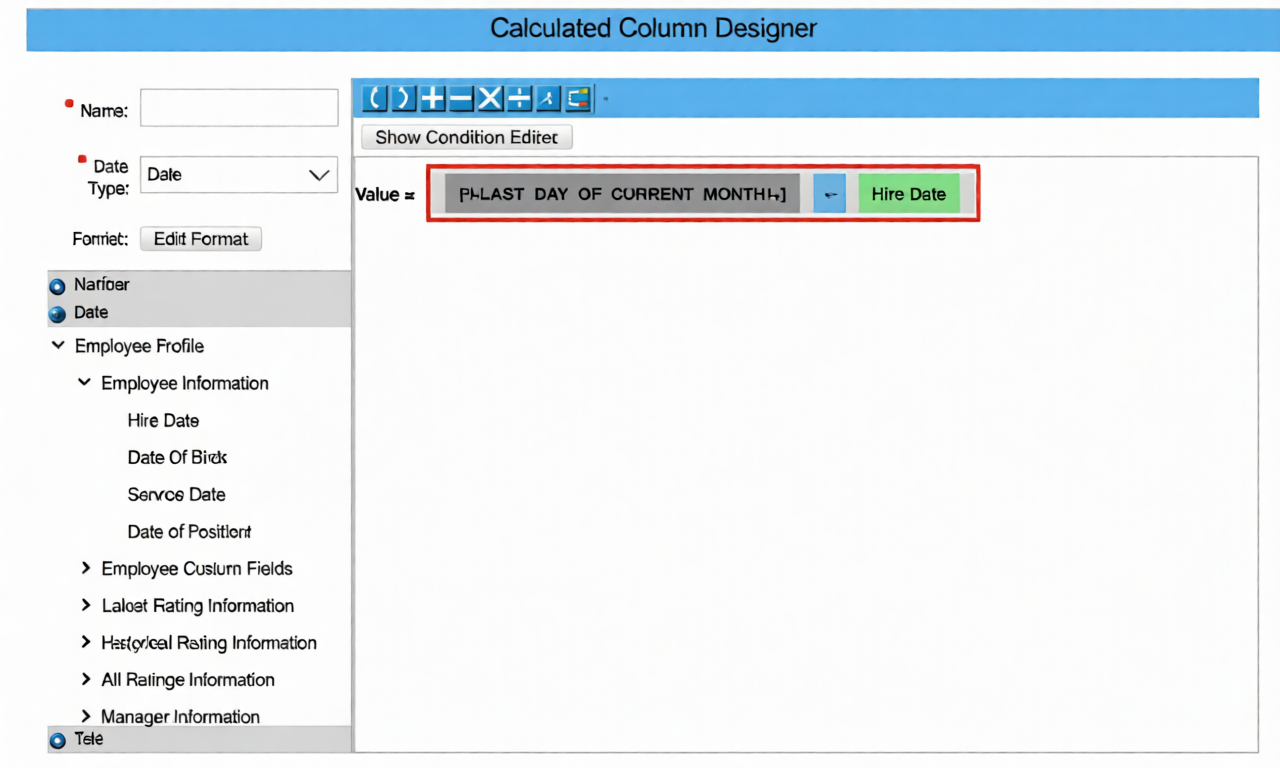
A. An incorrect dynamic date variable has been used.

B. An "if then else" statement needs to be included.

C. The result of the formula is negative.

D. An incorrect data type has been selected.

D.   An incorrect data type has been selected.

Page 2 out of 12 Pages