Learn, Practice, and Improve with SAP C_THR92_2505 Practice Test Questions
- 79 Questions
- Updated on: 3-Mar-2026
- SAP Certified Associate - SAP SuccessFactors People Analytics: Reporting
- Valid Worldwide
- 2790+ Prepared
- 4.9/5.0
What happens when you enable inline translation of a Story as it relates to future edits of the Story report? Note: There are 2 correct answers to this question.
A. The source language is chosen from enabled locales on the instance when enabling translation.
B. The report can be edited only in the source language.
C. The source language is set to the current locale of the individual who enabled translation.
D. The report can be edited in any language.
B. The report can be edited only in the source language.
What are the steps to create and assign a date filter to a tile?
A. Access Date Options. Configure the date type to Date Range. Configure the date from/date to. ^ Enable the date filter in the tile. Configure end user free selection of date range.
B. Enable the date filter in the tile. Access Date Options. Configure date type to Date Range. ^ Configure the date from/date to. Configure end user free selection of date range
C. Create a new date range. Configure the Name, label, and date from/date to. Enable the date filter in the tile. Configure end user free selection of date range.
D. Enable the date filter in the tile. Create a new date range. Configure the Name, label, and date from/date to. Configure end user free selection of date range.
You are working with nested labels on your instance in Report Center. How do you configure the labels as displayed in the screenshot? Note: There are 2 correct answers to this question.
A. Set "Nest label in;" to Recruiting.
B. Set "Nest label in:" to Talent Management.
C. Edit the Talent Management label in Manage Labels.
D. Edit the Recruiting label in Manage Labels.Answer:
You have a field in Job Information that stores the assignment of an employee to a Generic Object record for a Company Car Company Car records include an Assignment Date of the Car. You want to create a query that includes the Employee Information, and also include the Assignment Date of the Car. You add the Job Information Table to Query Designer. What steps do you take to accomplish the query? Note; There are 2 correct answers to this question.
A. In Job Information table, expand the Company Car Field.
B. In Job information table, select the Assignment Date field.
C. In Related tables, add the Company Car table to the Query.
D. In the Company Car table, select the Assignment Date Field.
You are configuring a story report. You add the image widget to the top-left corner of the canvas. You then upload the SAP SuccessFactors logo in the Builder, and select the logo image so it displays on the canvas. When you preview the report in View Mode, the logo appears centered on the canvas. What action do you take so the Logo appears in the top-left corner when viewing the report in View Mode?
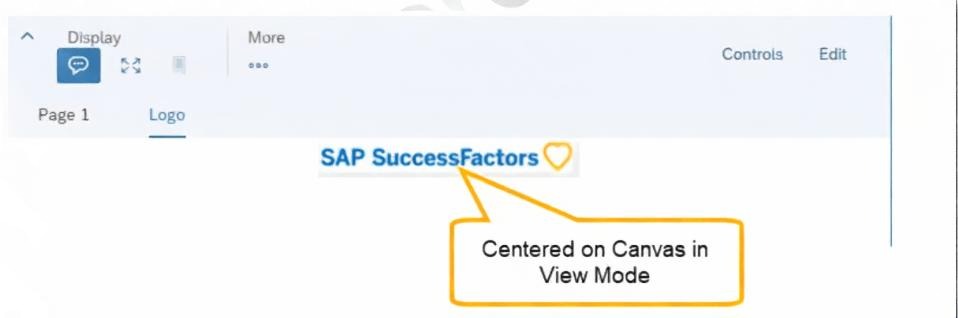
A. In Styling for the page, set the Page Size to Fixed.
B. In Builder for the image, set the image to Dynamic.
C. In Designer Mode, add another widget under the image.
D. In Styling for the image, set the Image Properties to Pan.
You are using a pivot table in your canvas report but the report does NOT display the most recent data. What could be the reason?
A. You are using a query with a static date filter.
B. You are NOT using a template.
C. You are using the percent of total option.
D. You are using a wrong People Scope.
Why would you export report definitions? Note: There are 2 correct answers to this question.
A. To move reports between company instances
B. To schedule reports for offline execution
C. To support report version control
D. To distribute reports to report consumers
C. To support report version control
| Page 4 out of 12 Pages |