Learn, Practice, and Improve with SAP C_THR92_2505 Practice Test Questions

  • 79 Questions
  • Updated on: 3-Mar-2026
  • SAP Certified Associate - SAP SuccessFactors People Analytics: Reporting
  • Valid Worldwide
  • 2790+ Prepared
  • 4.9/5.0

Stop guessing and start knowing. This SAP C_THR92_2505 practice test pinpoints exactly where your knowledge stands. Identify weak areas, validate strengths, and focus your preparation on topics that truly impact your SAP exam score. Targeted Free SAP Certified Associate - SAP SuccessFactors People Analytics: Reporting practice questions helps you walk into the exam confident and fully prepared.


How do you configure the Builder to display the table in the screenshot in a story report? Note: There are 3 correct answers to this question.
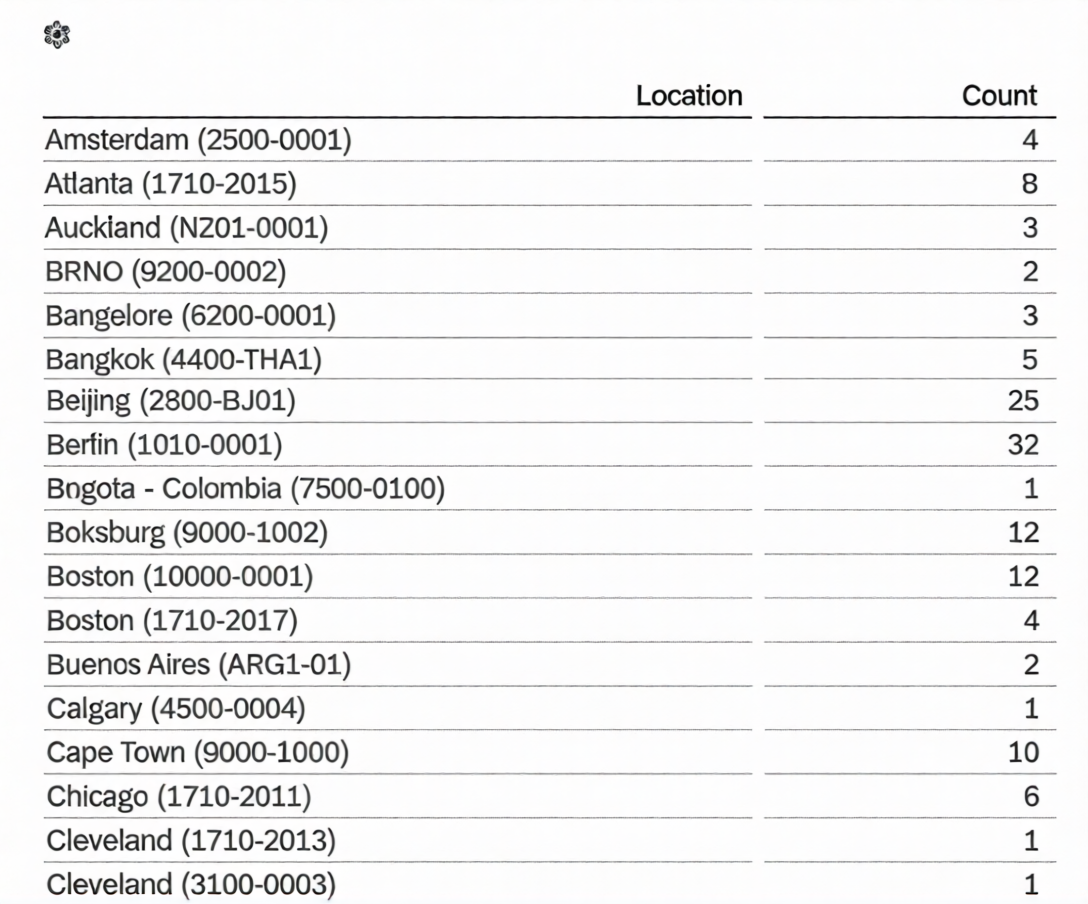
A. Row: Count

B. Column: Location

C. Table Structure: Aggregated List

D. Column: Count

E. Table Structure: Cross-tab

B.   Column: Location
C.   Table Structure: Aggregated List
D.   Column: Count

What features are available only when you use Business Intelligence and Reporting Tools (BIRT) with Table Reports? Note: There are 2 correct answers to this question.

A. SFTP scheduling

B. Simple data extraction

C. Printable chart with custom formatting requirements

D. Advanced cell level formulas

C.   Printable chart with custom formatting requirements
D.   Advanced cell level formulas

You want to create a tile-based dashboard and make it available to users. After you created and named the dashboard, which steps are required?

A. Create tiles(s). Select filters. Save dashboard.

B. Select tile(s). Select dataset. Save dashboard.

C. Create tile(s). Select dataset. Share dashboard.

D. Select tile(s). Save dashboard. Share dashboard.

D.   Select tile(s). Save dashboard. Share dashboard.

You are using Report Center to share a canvas report. You share the report with a Dynamic Group (see attached image). Who is the report shared with?
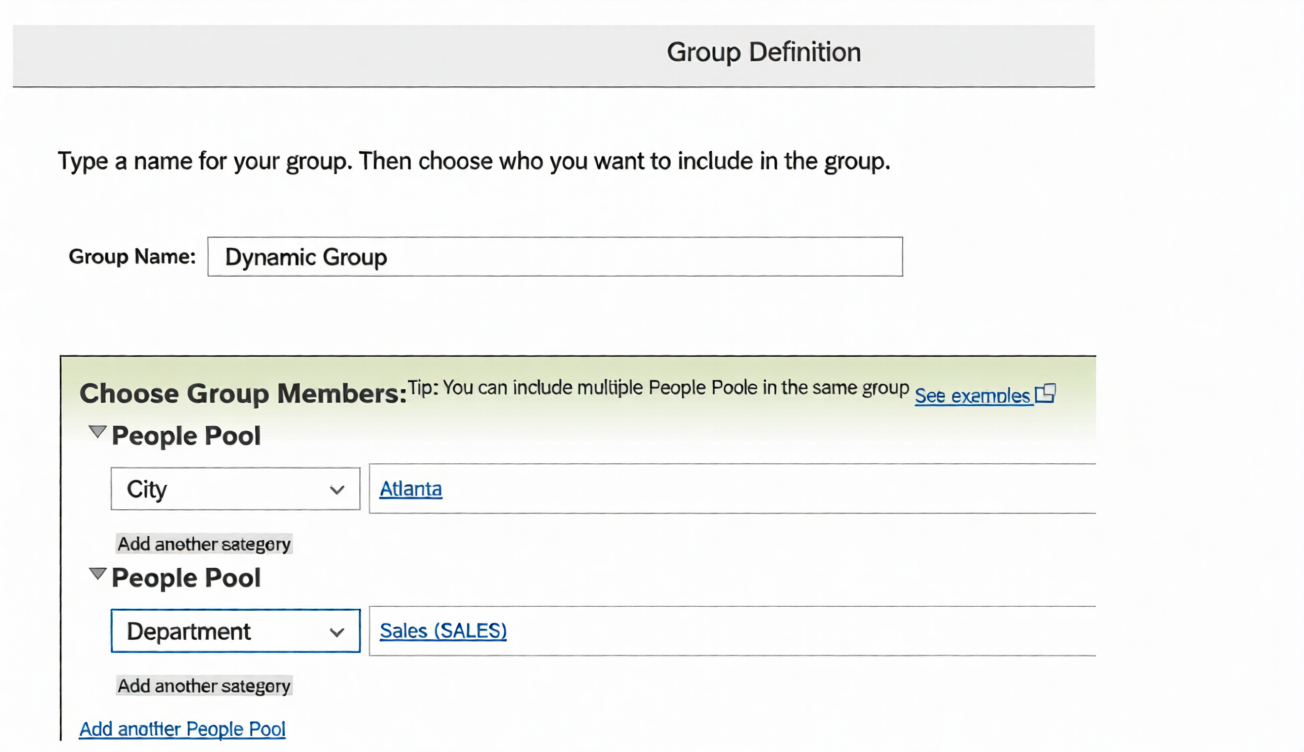
A. Employees of the Sales department

B. Employees of the Sales departments and all employees of Atlanta

C. Employees of the Sales department of Atlanta

D. Employees of Atlanta

B.   Employees of the Sales departments and all employees of Atlanta

While constructing a dashboard, you find that you need to create a tile that requires more complex
configuration than what is available with the Online Tile Builder tool. What tool can you use to create this tile?

A. PDFSam

B. Business Intelligence Reporting Tool (BIRT)

C. LMS Report Designer

D. YouCalc designer

D.   YouCalc designer

A report consumer claims that a canvas report shared with them is NO longer available in Report Center. Upon your investigation, you find the report has been deleted. You need to reproduce the report as quickly as possible. What action do you take?

A. Use the Restore Deleted Report tool to restore the report.

B. Create a new report and add orphaned pages. Share the report.

C. Contact SAP SuccessFactors support to request the report be restored.

D. Use the Recycle Bin to restore the Report.

B.   Create a new report and add orphaned pages. Share the report.

When you format a list report component, which actions can you perform? Note: There are 3 correct answers to this question.

A. Change the order of columns.

B. Change column types.

C. Adjust column widths.

D. Change column headers.

E. Save formats to a template.

A.   Change the order of columns.
C.   Adjust column widths.
D.   Change column headers.

Page 1 out of 12 Pages

Exam-Focused C_THR92_2505 SAP Certified Associate - SAP SuccessFactors People Analytics: Reporting Practice Questions


What it is:

A globally recognized associate-level certification from SAP that validates your foundational knowledge and practical skills in SAP SuccessFactors People Analytics: Reporting, demonstrating your ability to create, manage, and analyze HR reports and dashboards to support data-driven decision-making across SAP SuccessFactors solutions.

Exam details:

Exam code: C_THR92_2505
Duration: 180 minutes (3 hours)
Number of questions: 80 (multiple-choice/multiple-answer)
Passing score: Approx. 65–70%
Level: Associate (for HR analysts, consultants, and professionals working with SAP SuccessFactors People Analytics)

What it covers:

People Analytics Overview: Core concepts of SAP SuccessFactors People Analytics and its role in HR reporting and insights.
Story & Canvas Reporting: Creating and managing reports using Story Reports and Canvas Reports in People Analytics.
Data Models & Domains: Understanding data models, reporting domains, and relationships across SuccessFactors modules.
Calculated Columns & Measures: Building calculated fields, metrics, and KPIs for advanced HR analysis.
Filters, Prompts & Drill-Downs: Applying filters, prompts, and drill-down techniques for interactive reporting.
Permissions & Security: Managing role-based permissions, data access, and privacy controls for reporting.
Dashboards & Visualization: Designing dashboards and visualizations to present HR insights effectively.
Best Practices & Performance: Applying SAP best practices for report performance, data accuracy, and governance.